

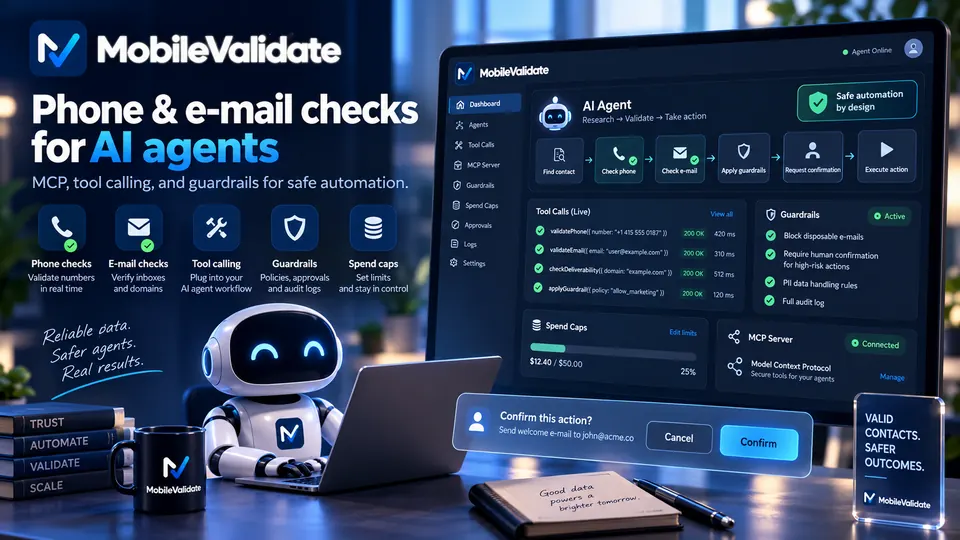
AI agents should verify a phone number or e-mail address before they send a message, place a call or book something. One MobileValidate call tells the agent whether the number is live on its network, which line type it is and whether the mailbox exists. Agent keys, spend caps and a confirmation step keep the agent's spending bounded.
Why do AI agents need contact verification?
An agent that acts in the world acts on contact details it didn't collect itself. A user dictates a number, a support ticket contains an address, a spreadsheet row has a phone in a national format. People make typos, and documents go out of date. A human assistant would notice that a number looks short or that an address domain is misspelled. An agent often won't, unless it has a tool that tells it.
The cost of acting on a bad contact is real:
- Failed actions. An SMS to an unassigned number or an e-mail to a mailbox that doesn't exist fails. The agent may then report success because the send call itself returned OK.
- Wrong recipients. A reassigned or mistyped number reaches a stranger. For an agent that sends reminders or payment links, that is a privacy incident.
- Wasted spend. Every failed SMS, call minute or retry costs money, and agents retry faster than people do.
- Bad downstream records. An agent that writes to a CRM spreads the error to every later workflow.
A verification tool gives the agent a fact it can reason about: the number is reachable, the mailbox doesn't exist, this is a fixed line, so SMS won't work. The agent can then correct itself or ask the user before it acts.
How does it work?
- Normalize first. The agent calls
normalize_numbers(free, runs locally) to turn what it has into E.164 format and flag ambiguous inputs, such as a national number with no country. - Estimate. For anything beyond a handful of contacts, the agent calls
estimate_cost. It's free and returns valid, invalid, duplicate and cached counts plus the maximum cost. - Check. The agent calls
lookup_numbersorlookup_emailswith the checks it needs, for examplehlrandemail. Behind the tools sits the samePOST /v1/lookupendpoint your own code would use. - Confirm if asked. If the maximum cost is above the confirmation threshold, the server answers
confirmation_requiredwith the amount. The agent shows that amount to the user and calls again withconfirm_max_cost. - Decide. The agent applies simple rules: act, ask the user to correct, or pick another channel. Unknown means "no information", never "bad contact".
- Record. The agent stores the decision and
checked_atwith the action, not the whole response.
The MCP server runs hosted at https://mcp.mobilevalidate.com/mcp or locally with the @mobilevalidate/mcp package. Agents that don't speak the Model Context Protocol can call the REST API directly with an agent key.
Which checks should an agent use?
| Check | What it answers | When the agent should use it | Service |
|---|---|---|---|
hlr | Is the mobile number assigned and reachable right now? Which network serves it? | Before sending an SMS, a code or a payment link | HLR lookup |
carrier | Is it mobile, fixed line or VoIP, and on which carrier? | Before choosing between SMS and a call | Carrier lookup |
mnp | Was the number ported, and which network is it on now? | When the agent routes messages or compares with a stored network | MNP lookup |
email | Does the mailbox exist at a major webmail provider? | Before sending a confirmation, invoice or booking by e-mail | E-mail mailbox check |
whatsapp | Does the number have a WhatsApp account? | When the user has opted in to messages on WhatsApp | WhatsApp check |
spam | Does the number appear in spam and nuisance-call reports? | Before an agent calls back or trusts an inbound number (limited access) | Spam reputation |
Keep the tool list small. Give the agent only the checks its task needs, and issue the agent key with only the scopes those tools need. An agent that books appointments needs hlr and email, not every check in the catalog. list_services shows which checks the key can use, with prices.
What guardrails keep an agent's spending safe?
Agents can loop, retry and misread instructions. The MCP server assumes that and puts limits outside the model:
- Agent keys only. Live keys (
mv_live_…) are rejected by the MCP server. An agent key (mv_agent_…) has exactly the scopes it was issued with and a daily spend cap. - Confirmation above a threshold. Spending calls whose maximum cost is above the threshold (default USD 1.00), and jobs with more than 100 numbers and e-mails, are refused with
confirmation_required. The confirmed amount is then sent to the API asmax_cost, so the request can't cost more. - Hard caps you control. The confirmation goes through the agent, so the server can't prove a human approved it. The daily spend cap and the scopes are the real limits. Set them to what the task needs.
- Anti-enumeration. 20 or more consecutive numbers, or generated e-mail lists, are refused with
suspected_enumeration, just as in the API. - No free-text echo. Tool output never echoes request metadata, and tools have no webhook URL parameter, which limits what a prompt injection can make the agent send out.
The MCP specification itself says that for trust and safety there should always be a human in the loop with the ability to deny tool invocations (MCP specification, tools). Spending confirmations are one practical way to follow that advice.
Example request
With a test key, +447700900001 answers reachable and [email protected] answers unknown. See test values. The agent sets max_cost, so the call can never cost more than it agreed to:
curl https://api.mobilevalidate.com/v1/lookup \
  -H "Authorization: Bearer mv_test_publicSandboxn9ZgneuhR1B9CRfKG3fulym" \
  -H "Content-Type: application/json" \
  -d '{"numbers":["+447700900001"],"emails":["[email protected]"],"checks":["hlr","email"],"max_cost":{"amount":"0.02","currency":"USD"}}'
// npm install mobilevalidate · Node.js 20+ · save as check.mjs and run: node check.mjs
import { MobileValidate } from "mobilevalidate";
// Omit apiKey to read MOBILEVALIDATE_API_KEY from the environment.
const mv = new MobileValidate({ apiKey: "mv_test_publicSandboxn9ZgneuhR1B9CRfKG3fulym" });
const { data, error } = await mv.lookup({
numbers: ["+447700900001"],
emails: ["[email protected]"],
checks: ["hlr", "email"],
maxCost: { amount: "0.02", currency: "USD" },
});
if (error) console.error(error.code, error.message);
else console.dir(data.results, { depth: null });// Node.js 18+, Deno, Bun or the browser console (ES module: save as .mjs or use "type": "module").
const res = await fetch("https://api.mobilevalidate.com/v1/lookup", {
method: "POST",
headers: {
Authorization: "Bearer mv_test_publicSandboxn9ZgneuhR1B9CRfKG3fulym",
"Content-Type": "application/json",
},
body: JSON.stringify({
numbers: ["+447700900001"],
emails: ["[email protected]"],
checks: ["hlr", "email"],
max_cost: { amount: "0.02", currency: "USD" },
}),
});
console.log(res.status, res.headers.get("x-request-id"));
console.dir(await res.json(), { depth: null });# pip install mobilevalidate-sdk
from mobilevalidate import MobileValidate
# Omit api_key to read MOBILEVALIDATE_API_KEY from the environment.
mv = MobileValidate(api_key="mv_test_publicSandboxn9ZgneuhR1B9CRfKG3fulym")
result = mv.lookup(
numbers=["+447700900001"],
emails=["[email protected]"],
checks=["hlr", "email"],
max_cost={ "amount": "0.02", "currency": "USD" },
)
print(result)<?php
$ch = curl_init('https://api.mobilevalidate.com/v1/lookup');
curl_setopt_array($ch, [
CURLOPT_POST => true,
CURLOPT_RETURNTRANSFER => true,
CURLOPT_HTTPHEADER => [
'Authorization: Bearer mv_test_publicSandboxn9ZgneuhR1B9CRfKG3fulym',
'Content-Type: application/json',
],
CURLOPT_POSTFIELDS => json_encode([
'numbers' => ['+447700900001'],
'emails' => ['[email protected]'],
'checks' => ['hlr', 'email'],
'max_cost' => [ 'amount' => '0.02', 'currency' => 'USD' ],
]),
]);
$response = curl_exec($ch);
echo curl_getinfo($ch, CURLINFO_RESPONSE_CODE), PHP_EOL, $response, PHP_EOL;package main
import (
"fmt"
"io"
"net/http"
"strings"
)
func main() {
body := strings.NewReader(`{"numbers":["+447700900001"],"emails":["[email protected]"],"checks":["hlr","email"],"max_cost":{"amount":"0.02","currency":"USD"}}`)
req, err := http.NewRequest("POST", "https://api.mobilevalidate.com/v1/lookup", body)
if err != nil {
panic(err)
}
req.Header.Set("Authorization", "Bearer mv_test_publicSandboxn9ZgneuhR1B9CRfKG3fulym")
req.Header.Set("Content-Type", "application/json")
res, err := http.DefaultClient.Do(req)
if err != nil {
panic(err)
}
defer res.Body.Close()
out, _ := io.ReadAll(res.Body)
fmt.Println(res.Status, string(out))
}require "net/http"
require "json"
uri = URI("https://api.mobilevalidate.com/v1/lookup")
req = Net::HTTP::Post.new(uri)
req["Authorization"] = "Bearer mv_test_publicSandboxn9ZgneuhR1B9CRfKG3fulym"
req["Content-Type"] = "application/json"
req.body = JSON.generate({
"numbers" => ["+447700900001"],
"emails" => ["[email protected]"],
"checks" => ["hlr", "email"],
"max_cost" => { "amount" => "0.02", "currency" => "USD" }
})
res = Net::HTTP.start(uri.host, uri.port, use_ssl: true) { |http| http.request(req) }
puts res.code, res.bodyRuns as pasted with the public sandbox key, which answers the test values only. In the SDKs, omit the key to use MOBILEVALIDATE_API_KEY.
Response (excerpt, test mode: the checks of the phone row, then of the e-mail row):
[
  {
    "number.hlr": {
      "service": "number.hlr", "status": "completed", "registered": true,
      "attributes": {"status": "reachable", "ported": false, "roaming": false, "network": "Test Mobile", "mcc_mnc": "23415", "country": "GB"},
      "confidence": "high", "confidence_score": 0.99, "checked_at": "2026-09-28T22:40:26.550Z",
      "cached": false, "age_seconds": 0, "billed": false, "reason": null, "poll_after_ms": null
    }
  },
  {
    "email.valid": {
      "service": "email.valid", "status": "unknown", "registered": null, "attributes": null,
      "confidence": null, "confidence_score": null, "checked_at": null,
      "cached": false, "age_seconds": null, "billed": false, "reason": "UPSTREAM_TIMEOUT", "poll_after_ms": null
    }
  }
]
The number is reachable, so the agent can send the SMS. The mailbox answer is unknown and free, so the agent should neither trust nor reject the address. It can send the e-mail as usual or ask the user to confirm it. Through MCP, the same call is lookup_numbers with numbers, emails and checks.
What should the agent do with each result?
| Result | Agent action |
|---|---|
HLR status: reachable | Proceed with SMS or a call |
HLR status: unreachable | Don't wait for an SMS to arrive. Offer e-mail or try later |
HLR status: invalid or number_status: invalid_number | Stop. Ask the user to check the number |
line_type: fixed_line | Don't send SMS. Call or use e-mail instead |
Mailbox registered: false | Stop. Ask the user to check the address |
Any check unknown | Continue with normal handling or ask the user. Never treat it as a failure |
confirmation_required | Show the amount to the user and wait for an explicit yes |
Write these rules into the agent's instructions or tool descriptions. Agents follow short, explicit rules better than general advice to "be careful".
How much does it cost?
Each check is billed per identifier, and only when the answer is conclusive. You're not charged for inconclusive results (unknown, unsupported country, timeout, invalid, duplicate). The HLR lookup is $0.005 per number and the MNP lookup is $0.001 per number. See pricing for every other check.
For agents, per-call cost is usually small, because an agent checks one or two contacts at a time. The risk is volume: a loop that checks the same list again and again. Answers inside each service's freshness window come from your account's cache and are free (cached: true, billed: false), which blunts that risk. The daily spend cap stops the rest.
What about consent and acceptable use?
The agent should check only contacts it has a lawful reason to process: the user's own contacts, customers, people who asked to be contacted. A passed check is not consent to message someone. Business messages on WhatsApp and similar platforms require the recipient's opt-in.
The acceptable use policy applies to agents exactly as to people. It forbids unsolicited bulk messaging, scraping, and building lists of the people who use an app. Checks never return names or profiles, and reverse lookups are not offered. People can object to checks of their number or address through the opt-out form. Suppressed contacts are never checked or charged.
What are common mistakes?
- Giving the agent a live key. Use an agent key with a daily cap. The MCP server refuses live keys for this reason.
- Treating unknown as fake. An agent that tells a user "your number is invalid" after an unknown answer is wrong and loses trust.
- Checking after acting. The check belongs before the send, call or booking, not in a report afterwards.
- Letting the agent confirm its own spending. Route
confirmation_requiredto a person, or set the threshold and cap so that no confirmation is ever needed for routine work. - Storing full responses in memory. Keep the decision and
checked_at. Results describe a person's phone, so keep only what the task needs. - Too many tools. Every extra check is another way for the agent to spend. Match the key's scopes to the task.
Frequently asked questions
Why should an AI agent verify a phone number or e-mail before acting?
Because agents act on contact details that users typed, pasted or that came from documents, and a wrong digit or a dead mailbox turns into a failed message, a wasted call or a message to the wrong person. A check first gives the agent a fact to reason with instead of a guess.
Can an agent use my live API key?
No. The MCP server accepts only agent keys (mv_agent_…) and test keys. Agent keys carry only the scopes they were issued with and a daily spend cap, so an agent can never spend without a limit.
What stops an agent from running up a large bill?
Three layers. Calls whose maximum cost is above the confirmation threshold (default USD 1.00), or jobs with more than 100 identifiers, are refused until the agent repeats them with the confirmed amount. That amount is enforced as max_cost. The agent key's daily spend cap is the hard limit.
Does the agent get a name or profile for the number?
No. Tools return yes, no or unknown per check, plus network data such as line type, carrier or reachability. Names, photos and profiles are never returned, and reverse lookups are not offered.
What should the agent do with an unknown result?
Treat it as missing information, not as a negative answer. Unknown results are free. The agent should fall back to its normal behaviour or ask the user, never conclude that the contact is fake.
Can an agent search for people who use a messaging app?
No. Checks run only on numbers and addresses the agent already has for a lawful reason. Sequential number ranges and generated e-mail lists are rejected, and the acceptable use policy forbids building lists of app users.
Can I try it without spending anything?
Yes. Test keys answer the documented test numbers and addresses, such as +447700900001 and [email protected], with fixed answers and are never billed.