On this page
E-mail verification is a short ladder of checks that tells you whether an address can receive mail before you depend on it: is it well formed, does its domain accept mail, and does the mailbox exist? Each rung is cheaper than the next and catches different mistakes. None of them proves that a person reads the inbox. Only a confirmation message does that, so good flows combine pre-checks with confirmation.
This guide is the hub for everything we publish on e-mail checks. Each section below gives a short, self-contained answer and points to the page with the details: a guide, a glossary entry, a service page or the API docs.
In this guide:
- The verification ladder
- Syntax and normalization
- Domain and MX checks
- Mailbox existence
- Catch-all domains
- Disposable addresses and privacy relays
- Bounces and sender reputation
- Account existence signals
- Sign-up fraud and lead forms
- Which check for which job
- Building it with the API
- Privacy and limits
- What we don't do
Which page answers which question?
| Question | Where the full answer is |
|---|---|
| What's the difference between a mailbox check and an account check? | E-mail verification vs account existence checks |
| How do phone and e-mail checks stop fake sign-ups together? | Reduce fake sign-ups with phone and e-mail checks |
| What does GDPR expect when I check addresses? | Privacy checklist for phone and e-mail checks |
| What is an MX record and a null MX? | MX record |
| What is a catch-all domain? | Catch-all e-mail |
| What counts as a disposable address? | Disposable e-mail address |
| What is a hard or soft bounce? | E-mail bounce |
| How do I call the e-mail checks? | E-mail checks docs and the sign-up recipe |
| What does the mailbox check return? | Mailbox check |
What are the rungs of the e-mail verification ladder?
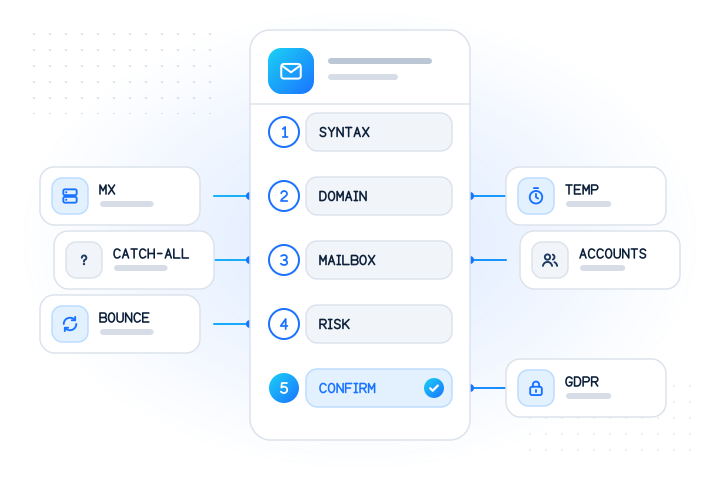
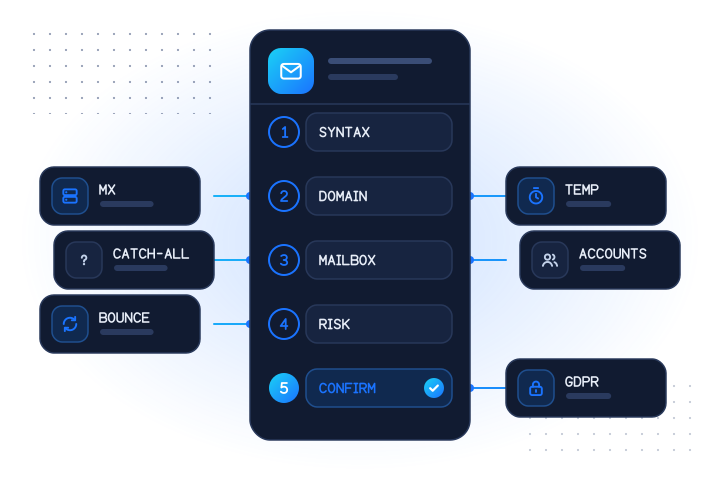
Think of verification as five questions asked in order. Stop as soon as one gives a firm answer, because the later rungs cost more time, money or user patience.
| Rung | Question | Typical method | What it can't tell you |
|---|---|---|---|
| 1. Syntax | Could this string be an address? | Parser plus trimming | Whether the domain exists |
| 2. Domain | Does the domain accept mail? | DNS lookup of MX records | Whether the mailbox exists |
| 3. Mailbox | Is there a mailbox with this name? | Provider-level check | Whether anyone reads it |
| 4. Risk | Is the address throwaway or brand new? | Domain lists, account signals, phone checks | Intent |
| 5. Control | Does this person control the inbox? | Confirmation link or code | Nothing more is needed |
Rungs one and two are free and local. Rung three needs outside data. Rung four is about fraud, not deliverability, and rung five is the only one that proves ownership.
How should you check syntax and normalize an address?
Keep the syntax rung simple. Trim spaces, lowercase the address for comparison, and reject strings without exactly one @ or with an empty local part or domain. Very strict patterns cause more harm than good: they reject real addresses with plus tags, apostrophes or long top-level domains, and people abandon the form.
Be careful with "clever" normalization. Removing dots or +tags makes sense for one provider and is wrong for another, and it can merge two different people's addresses into one record. Our API only trims and lowercases, for exactly that reason, and returns email_status: "invalid_email" for anything malformed without running or charging any check. The rules are in the e-mail checks docs.
Syntax checks belong in the browser for instant feedback and again on the server, which is the only copy you can trust.
What does a domain and MX check catch?
The second rung asks DNS whether the domain after the @ publishes mail servers. An MX record names the hosts that accept mail for a domain, with a preference order, as defined in RFC 1035 [2]. If a domain doesn't exist at all, the address is almost certainly a typo. If it publishes a "null MX", a single record with preference 0 and an empty host, it has declared that it accepts no mail (RFC 7505) [3].
This rung catches mistyped provider domains while the person is still on the page, which is the cheapest moment to fix them. It says nothing about the mailbox: a made-up name at a big webmail domain passes. Details and a result table are in our MX record entry.
How do you know whether a mailbox exists?
This is the rung people usually mean by "verify". The mail protocol once had a command for it, VRFY, but RFC 5321 lets servers disable it for security reasons (§7.3), so a server owes you no useful answer [1]. Starting a delivery and stopping before the message body gives inconsistent answers, and probing from your own servers can hurt the reputation of the IP addresses you send real mail from.
Our mailbox check (email.valid) answers for major webmail providers, in real time or in bulk, without sending mail and without opening the mailbox. The answer is registered: true, false or null with a reason. Company and custom domains return unknown with UNSUPPORTED_PROVIDER and aren't charged. The comparison with do-it-yourself probing is covered in e-mail verification vs account existence checks.
What should you do with catch-all domains?
A catch-all (or accept-all) domain accepts mail for every name at the domain, whether or not a mailbox with that name exists. The standard leaves the meaning of the local part to the receiving host alone (RFC 5321 §2.3.11), so from outside, a real and an invented address at such a domain look the same [1].
That makes "valid" the wrong label for any catch-all address. The honest status is unknown. In practice:
- Keep catch-all results in their own bucket so reports don't count them as confirmed.
- Send a confirmation link at sign-up, because it's the only proof that works on these domains.
- Watch for late bounces from opted-in contacts and suppress them.
Catch-all domains are mostly company domains, which sit outside our mailbox check's coverage anyway. The catch-all glossary entry explains the SMTP mechanics.
How should you treat disposable addresses and privacy relays?
Disposable (temp-mail) addresses work for a few minutes or hours, often in an inbox anyone can open. They pass syntax, MX and even mailbox checks, which is why they need their own treatment. The usual tool is a domain list, refreshed often, because temp-mail services rotate domains when sites block them.
Don't confuse them with privacy relays. Apple's Hide My Email, for example, "generates unique, random email addresses that automatically forward to your personal email inbox" [6]. Relay users are real, often loyal customers who want less spam. Blocking them loses sign-ups for no fraud benefit.
A sensible policy is tiered: accept disposable addresses for low-risk actions, require confirmation or an extra signal for trials and rewards, and block only where abuse is proven. We don't return a disposable-domain flag today. See the disposable e-mail address entry for the difference between the two in a table.
Why do bounces matter so much?
A bounce is a refusal from the receiving side. RFC 3463 codes make the type visible: 5.1.1 means the destination mailbox doesn't exist (permanent), while 4.2.2 means it is full (temporary) [4]. Hard bounces should suppress the address at once. Soft bounces deserve a few retries first.
Mailbox providers read bounce patterns as a sign of list quality. Google's sender guidelines tell senders to keep spam rates reported in Postmaster Tools below 0.3% and to automatically unsubscribe recipients who have multiple bounced messages [5]. Bounces and complaints come from the same habit, mailing addresses that never worked or no longer do, and they hurt the mail you care about, such as receipts and password resets.
Verifying at entry is the cheapest prevention. Our e-mail bounce entry lists the common codes and what to do with each.
What do account existence checks add?
A mailbox check asks whether mail can arrive. An account existence check asks something else: whether a given service has an account registered with this address. We offer per-provider checks such as the Gmail, Outlook and Yahoo account checks, and platform checks such as the Apple Account and LinkedIn checks.
These are fraud and account-security signals. An address with a mailbox and accounts on established services is less likely to be throwaway. A new recovery address with no mailbox at all is a reason to step up verification. They are also more sensitive than a mailbox answer, so use them only with a clear purpose and store the decision rather than a list of services. All answers are yes, no or unknown, never names or profiles. The trade-offs are in e-mail verification vs account existence checks.
How does e-mail verification fit into sign-up fraud defence?
No single check stops fake accounts, because attackers switch to whatever you don't check. Combine layers: the e-mail ladder above, the phone number's line type and messaging-app presence, and your own velocity rules. Then map the combined result to friction tiers rather than a yes or no: let clear cases through, ask doubtful ones for a confirmation or a second factor, and review the rest.
The fake sign-ups guide walks through the layers and how to measure false positives. For the product view, see OTP and sign-up fraud and account security.
Lead forms need the same checks for a different reason: sales time. A lead whose mailbox doesn't exist is either a typo you can fix while the person is on the page, or not a lead at all. Lead verification checks phone and e-mail in one request.
Which check should you use for which job?
| Job | Checks to run | On a negative answer | On unknown |
|---|---|---|---|
| Consumer sign-up | Syntax, MX, mailbox | Ask for a correction | Send the confirmation link as usual |
| Free trial or reward | Above, plus phone line type and an account signal | Correct or add friction | Confirm and add a phone check |
| Checkout receipt | Syntax, MX, mailbox | Ask before payment | Accept; show the address back to the buyer |
| B2B lead form | Syntax, MX | Ask for a correction | Route to normal follow-up |
| List import | Syntax, MX, mailbox in a bulk job | Suppress | Keep, but watch bounces |
| Recovery-address change | Mailbox plus account signal | Step up verification | Step up verification |
B2B and custom domains are where outside checks are weakest, so confirmation and engagement matter most there.
How do you build this with the MobileValidate API?
Send addresses in the emails array of POST /v1/lookup with at least one e-mail check, such as email for the mailbox. One request can mix phone numbers and addresses, up to 100 identifiers. Per-provider account checks and larger lists run as bulk jobs, up to 50,000 rows. Each row returns the normalized address, an email_status, and one entry per check with registered, status, reason and checked_at.
The sign-up recipe shows the decision logic in Node and Python, including how to handle unknown without blocking real users. Test mode gives fixed answers on the reserved test.mobilevalidate.com domain, so you can exercise every branch without being billed. Full field descriptions are in the e-mail checks docs.
What privacy rules and limits apply?
An e-mail address is usually personal data, and an answer about which services someone uses can reveal more than the address itself. Under the GDPR, that means a documented purpose and lawful basis, minimal retention, and a way to object [7]. Our privacy checklist turns those duties into ten concrete questions.
On our side, the API refuses requests that look like generated address lists: 20 or more addresses on one domain that differ only by digits or separators in one request, or 50 or more of one such pattern from a live account in a UTC day. Addresses on our suppression list come back as suppressed and are never checked. See rate limits and abuse. These checks exist for fraud prevention and deliverability, not for finding out who owns an address.
What doesn't MobileValidate check?
Being clear about gaps helps you design around them:
- Custom and company domains: the mailbox check covers major webmail providers only. Other domains answer unknown, free of charge.
- Catch-all detection: we don't label catch-all addresses, and we never call them valid.
- Disposable domains: we don't return a disposable flag. Keep your own list or add a confirmation step.
- Ownership: we never return names, photos or profiles for an address.
For those needs, the syntax and MX rungs run in your own code, and confirmation e-mails remain the proof of control.
What are the key takeaways?
- Verification is a ladder: syntax, domain, mailbox, risk, then confirmation. Run the cheap rungs first.
- MX checks catch typo domains but say nothing about the mailbox.
- Mailbox answers are possible for major webmail providers. Catch-all and custom domains stay unknown, and unknown should never be sold or stored as valid.
- Treat disposable addresses and privacy relays differently. Relays belong to real customers.
- Bounces hurt reputation. Suppress hard bounces and verify at entry.
- Account checks are fraud signals with higher sensitivity. Keep the decision, not the details.
- Start with the mailbox check and test it for free in test mode.
Gmail, Outlook, Yahoo, Apple and LinkedIn are named descriptively. MobileValidate is not affiliated with any provider named here.
Sources
- RFC 5321: Simple Mail Transfer Protocol — IETF, 2008
- RFC 1035: Domain names, implementation and specification — IETF, 1987
- RFC 7505: A "Null MX" No Service Resource Record for Domains That Accept No Mail — IETF, 2015
- RFC 3463: Enhanced Mail System Status Codes — IETF, 2003
- Email sender guidelines — Google Workspace Admin Help, 2026
- What is Hide My Email? — Apple Support, 2026
- General Data Protection Regulation (EU) 2016/679 — European Union, 2016
Frequently asked questions
What is e-mail verification?
It is the set of checks that tell you whether an e-mail address can receive mail before you rely on it: the address is well formed, its domain accepts mail, and the mailbox exists. A confirmation link then proves the person controls it.
Can you verify an e-mail address without sending a message?
Partly. Syntax and MX checks are always possible. Whether a specific mailbox exists can be answered for some providers, but not for catch-all domains or servers that refuse to reveal it. Only a confirmation message proves that someone reads the inbox.
Which addresses does the MobileValidate mailbox check cover?
Addresses at major webmail providers. Company and custom domains come back as unknown with the reason UNSUPPORTED_PROVIDER, and those rows are not charged.
Should I block disposable or catch-all addresses at sign-up?
Usually not outright. Treat them as uncertain: send a confirmation link, and add friction such as a phone check only where abuse is costly, like free trials or sign-up rewards.
Is an e-mail address personal data?
Usually yes, when it belongs to or points to a person. Check only addresses people gave you, for a documented purpose such as fraud prevention or making sure their mail arrives, and keep only what you need.
Related services and guides
More from the blog
All articlesGuides
E-mail verification vs account existence checks: what's the difference?
Mailbox validation says an address can receive mail. An account check says it is registered on a service. When to use each, and the privacy rules.
7 min read
Fraud prevention
How to reduce fake sign-ups with layered phone and e-mail checks
A layered sign-up defence: format, line type, messaging presence, spam reputation and e-mail checks, mapped to friction tiers you can measure.
8 min read
Guides
A privacy checklist for phone and e-mail checks
A practical GDPR-oriented checklist for phone and e-mail checks: purpose, lawful basis, minimisation, retention, objections, rights, DPAs and logging.
9 min read