SMS spend drops when you stop paying for messages that can't arrive and move expected messages to cheaper channels people already use. A check before sending finds invalid and duplicate numbers for free, lines that can't take SMS, numbers that aren't assigned or reachable, and opted-in contacts who can be reached on a messenger instead.
Where does SMS money get wasted?
Most wasted spend falls into five groups:
- Badly formatted or impossible numbers. Typos, missing country codes and numbers that can't exist. The API parses each one and marks it
invalid_number, at no charge. - Duplicates. The same person entered twice in different formats, for example
07700 900001and+447700900001. After E.164 normalization they are the same number, and the repeat is markedduplicate, also free. - Lines that don't take SMS. Fixed lines and some special number types. The carrier lookup reports
line_type, and for US and Canadian numbers there is a bulk carrier lookup. - Numbers that aren't assigned or reachable. Old lists decay as people give up numbers. The HLR lookup asks the home network whether each mobile number is
reachable,unreachableorinvalid(not assigned). See number reachability. - Messages that could go elsewhere. Some opted-in contacts prefer a messenger such as WhatsApp, Viber or RCS, where the per-message price may be lower than your SMS rate.
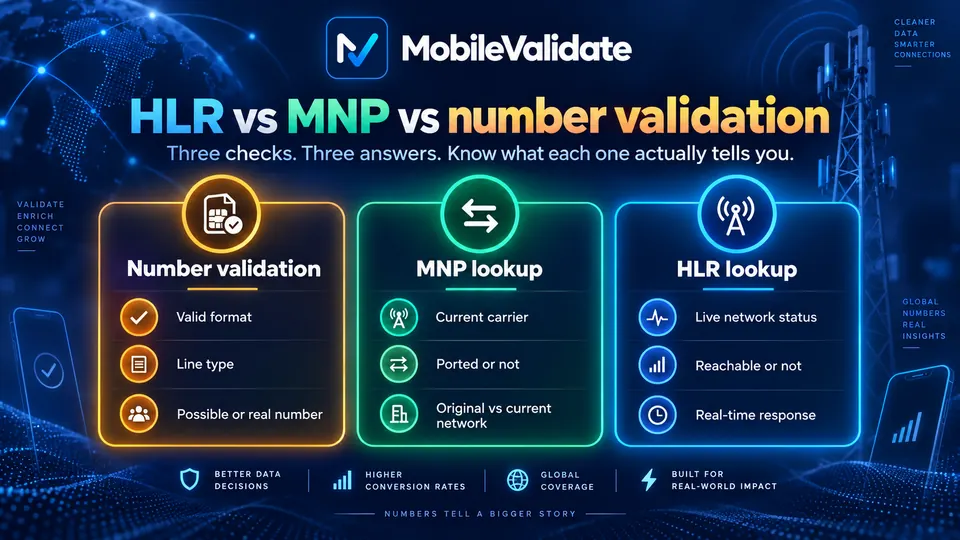
The first two are free to find. The rest cost a check each, so they're worth it where your SMS rates are high or your list is old. If you route traffic yourself, the MNP lookup tells you which network a ported number is on now, so you can pick the right route and price.
How does the workflow look?
For list cleaning, use bulk jobs:
- Call
POST /v1/jobs/estimatewith the list and the checks you plan to run. It's free and shows how many rows are valid, invalid, duplicate, already cached, unsupported or suppressed, plus the maximum cost. - Create the job with
POST /v1/jobsand pass the estimate's amount asmax_cost. - Wait with
GET /v1/jobs/{id}?wait=30, or subscribe to thejob.completedwebhook. - Download the results as CSV or NDJSON (
GET /v1/jobs/{id}/download?format=csv). The file keeps your original row order and adds one column per check. - Remove invalid and unassigned rows, set fixed lines to voice or e-mail, hold unreachable numbers for a later send, and route contacts to the channels they opted into.
For messages sent one at a time, such as order updates, a real-time lookup before each send does the same job. Our guide to cleaning a phone list in bulk walks through a full run.
Which checks answer which question?
| Check | What it answers | When to run it | Link |
|---|---|---|---|
| Format and duplicates (free, automatic) | Is the number possible? Is it a repeat? | Every job and lookup | E.164 |
carrier | Mobile, fixed line or VoIP? | Before the first send to a number | Carrier lookup |
hlr | Is the number assigned and reachable now? | Old or unverified lists; before large sends | HLR lookup |
mnp | Was the number ported? Which network is it on now? | When you choose routes per network | MNP lookup |
whatsapp, viber, rcs | Can an opted-in contact be reached on a cheaper channel? | Periodic refresh of opted-in contacts | WhatsApp, RCS |
What should you do with each result?
| Result | Suggested action |
|---|---|
number_status: invalid_number | Remove the number or ask the customer to correct it |
number_status: duplicate | Keep one row per person |
line_type: fixed_line | Don't send SMS; use voice or e-mail |
line_type: mobile | Send SMS as usual |
HLR status: invalid | Remove; the number isn't assigned |
HLR status: unreachable | Hold and retry later, or use another agreed channel |
MNP porting: ported | Route by the current mcc_mnc, not the original network |
Messenger registered: true and the contact opted in to it | Consider sending on that channel |
Messenger registered: false | Keep SMS for this contact |
Any check unknown | Keep your current routing. Unknown results are free, so you lose nothing but the check |
How much does it cost?
Bulk checks cost less per check than real-time lookups for most services, and invalid, duplicate and suppressed rows are never charged. You're not charged for inconclusive results (unknown, unsupported country, timeout, invalid, duplicate). The MNP lookup costs less than the HLR lookup. See pricing for current HLR, MNP and other rates.
To work out whether it pays off, multiply the checks you plan to run by their price. Then compare that with the SMS spend you would avoid: messages to invalid, duplicate and unassigned numbers, messages to fixed lines, and messages you can move to a cheaper channel. Checks of the same number inside the freshness window are served free from your account's cache, so running an updated list again doesn't bill the same numbers twice.
What does a request look like?
First, a free estimate. The list below holds two valid test numbers, one duplicate and one invalid entry:
curl https://api.mobilevalidate.com/v1/jobs/estimate \
  -H "Authorization: Bearer mv_test_publicSandboxn9ZgneuhR1B9CRfKG3fulym" \
  -H "Content-Type: application/json" \
  -d '{"numbers":["+447700900001","+447700900002","+447700900002","12345"],"checks":["whatsapp","viber"]}'
// npm install mobilevalidate · Node.js 20+ · save as check.mjs and run: node check.mjs
import { MobileValidate } from "mobilevalidate";
// Omit apiKey to read MOBILEVALIDATE_API_KEY from the environment.
const mv = new MobileValidate({ apiKey: "mv_test_publicSandboxn9ZgneuhR1B9CRfKG3fulym" });
const { data, error } = await mv.jobs.estimate({
numbers: ["+447700900001", "+447700900002", "+447700900002", "12345"],
checks: ["whatsapp", "viber"],
});
if (error) console.error(error.code, error.message);
else console.dir(data, { depth: null });// Node.js 18+, Deno, Bun or the browser console (ES module: save as .mjs or use "type": "module").
const res = await fetch("https://api.mobilevalidate.com/v1/jobs/estimate", {
method: "POST",
headers: {
Authorization: "Bearer mv_test_publicSandboxn9ZgneuhR1B9CRfKG3fulym",
"Content-Type": "application/json",
},
body: JSON.stringify({
numbers: [
"+447700900001",
"+447700900002",
"+447700900002",
"12345",
],
checks: ["whatsapp", "viber"],
}),
});
console.log(res.status, res.headers.get("x-request-id"));
console.dir(await res.json(), { depth: null });# pip install mobilevalidate-sdk
from mobilevalidate import MobileValidate
# Omit api_key to read MOBILEVALIDATE_API_KEY from the environment.
mv = MobileValidate(api_key="mv_test_publicSandboxn9ZgneuhR1B9CRfKG3fulym")
result = mv.jobs.estimate(
numbers=["+447700900001", "+447700900002", "+447700900002", "12345"],
checks=["whatsapp", "viber"],
)
print(result)<?php
$ch = curl_init('https://api.mobilevalidate.com/v1/jobs/estimate');
curl_setopt_array($ch, [
CURLOPT_POST => true,
CURLOPT_RETURNTRANSFER => true,
CURLOPT_HTTPHEADER => [
'Authorization: Bearer mv_test_publicSandboxn9ZgneuhR1B9CRfKG3fulym',
'Content-Type: application/json',
],
CURLOPT_POSTFIELDS => json_encode([
'numbers' => [
'+447700900001',
'+447700900002',
'+447700900002',
'12345',
],
'checks' => ['whatsapp', 'viber'],
]),
]);
$response = curl_exec($ch);
echo curl_getinfo($ch, CURLINFO_RESPONSE_CODE), PHP_EOL, $response, PHP_EOL;package main
import (
"fmt"
"io"
"net/http"
"strings"
)
func main() {
body := strings.NewReader(`{"numbers":["+447700900001","+447700900002","+447700900002","12345"],"checks":["whatsapp","viber"]}`)
req, err := http.NewRequest("POST", "https://api.mobilevalidate.com/v1/jobs/estimate", body)
if err != nil {
panic(err)
}
req.Header.Set("Authorization", "Bearer mv_test_publicSandboxn9ZgneuhR1B9CRfKG3fulym")
req.Header.Set("Content-Type", "application/json")
res, err := http.DefaultClient.Do(req)
if err != nil {
panic(err)
}
defer res.Body.Close()
out, _ := io.ReadAll(res.Body)
fmt.Println(res.Status, string(out))
}require "net/http"
require "json"
uri = URI("https://api.mobilevalidate.com/v1/jobs/estimate")
req = Net::HTTP::Post.new(uri)
req["Authorization"] = "Bearer mv_test_publicSandboxn9ZgneuhR1B9CRfKG3fulym"
req["Content-Type"] = "application/json"
req.body = JSON.generate({
"numbers" => [
"+447700900001",
"+447700900002",
"+447700900002",
"12345"
],
"checks" => ["whatsapp", "viber"]
})
res = Net::HTTP.start(uri.host, uri.port, use_ssl: true) { |http| http.request(req) }
puts res.code, res.bodyRuns as pasted with the public sandbox key, which answers the test values only. In the SDKs, omit the key to use MOBILEVALIDATE_API_KEY.
Response (test mode):
{
  "object": "estimate",
  "total": 4,
  "valid": 2,
  "invalid": 1,
  "duplicate": 1,
  "cached": 0,
  "unsupported": 0,
  "suppressed": 0,
  "checks": ["whatsapp.registered", "viber.registered"],
  "checks_total": 8,
  "billable_max": 0,
  "max_cost": {"amount": "0", "currency": "USD"}
}
Test keys are never charged, so billable_max and max_cost are zero here. With a live key they show the most the job could cost. Only the two valid numbers would be checked. A live network check on the same two numbers runs in real time:
curl https://api.mobilevalidate.com/v1/lookup \
  -H "Authorization: Bearer mv_test_publicSandboxn9ZgneuhR1B9CRfKG3fulym" \
  -H "Content-Type: application/json" \
  -d '{"numbers":["+447700900001","+447700900002"],"checks":["hlr"]}'
// npm install mobilevalidate · Node.js 20+ · save as check.mjs and run: node check.mjs
import { MobileValidate } from "mobilevalidate";
// Omit apiKey to read MOBILEVALIDATE_API_KEY from the environment.
const mv = new MobileValidate({ apiKey: "mv_test_publicSandboxn9ZgneuhR1B9CRfKG3fulym" });
const { data, error } = await mv.lookup({
numbers: ["+447700900001", "+447700900002"],
checks: ["hlr"],
});
if (error) console.error(error.code, error.message);
else console.dir(data.results, { depth: null });// Node.js 18+, Deno, Bun or the browser console (ES module: save as .mjs or use "type": "module").
const res = await fetch("https://api.mobilevalidate.com/v1/lookup", {
method: "POST",
headers: {
Authorization: "Bearer mv_test_publicSandboxn9ZgneuhR1B9CRfKG3fulym",
"Content-Type": "application/json",
},
body: JSON.stringify({
numbers: ["+447700900001", "+447700900002"],
checks: ["hlr"],
}),
});
console.log(res.status, res.headers.get("x-request-id"));
console.dir(await res.json(), { depth: null });# pip install mobilevalidate-sdk
from mobilevalidate import MobileValidate
# Omit api_key to read MOBILEVALIDATE_API_KEY from the environment.
mv = MobileValidate(api_key="mv_test_publicSandboxn9ZgneuhR1B9CRfKG3fulym")
result = mv.lookup(numbers=["+447700900001", "+447700900002"], checks=["hlr"])
print(result)<?php
$ch = curl_init('https://api.mobilevalidate.com/v1/lookup');
curl_setopt_array($ch, [
CURLOPT_POST => true,
CURLOPT_RETURNTRANSFER => true,
CURLOPT_HTTPHEADER => [
'Authorization: Bearer mv_test_publicSandboxn9ZgneuhR1B9CRfKG3fulym',
'Content-Type: application/json',
],
CURLOPT_POSTFIELDS => json_encode([
'numbers' => ['+447700900001', '+447700900002'],
'checks' => ['hlr'],
]),
]);
$response = curl_exec($ch);
echo curl_getinfo($ch, CURLINFO_RESPONSE_CODE), PHP_EOL, $response, PHP_EOL;package main
import (
"fmt"
"io"
"net/http"
"strings"
)
func main() {
body := strings.NewReader(`{"numbers":["+447700900001","+447700900002"],"checks":["hlr"]}`)
req, err := http.NewRequest("POST", "https://api.mobilevalidate.com/v1/lookup", body)
if err != nil {
panic(err)
}
req.Header.Set("Authorization", "Bearer mv_test_publicSandboxn9ZgneuhR1B9CRfKG3fulym")
req.Header.Set("Content-Type", "application/json")
res, err := http.DefaultClient.Do(req)
if err != nil {
panic(err)
}
defer res.Body.Close()
out, _ := io.ReadAll(res.Body)
fmt.Println(res.Status, string(out))
}require "net/http"
require "json"
uri = URI("https://api.mobilevalidate.com/v1/lookup")
req = Net::HTTP::Post.new(uri)
req["Authorization"] = "Bearer mv_test_publicSandboxn9ZgneuhR1B9CRfKG3fulym"
req["Content-Type"] = "application/json"
req.body = JSON.generate({
"numbers" => ["+447700900001", "+447700900002"],
"checks" => ["hlr"]
})
res = Net::HTTP.start(uri.host, uri.port, use_ssl: true) { |http| http.request(req) }
puts res.code, res.bodyRuns as pasted with the public sandbox key, which answers the test values only. In the SDKs, omit the key to use MOBILEVALIDATE_API_KEY.
Response (excerpt, test mode: the checks of the second item, a number whose phone is off):
{
  "number.hlr": {
    "service": "number.hlr", "status": "completed", "registered": true,
    "attributes": {"status": "unreachable", "ported": false, "roaming": false, "network": "Test Mobile", "mcc_mnc": "23415", "country": "GB"},
    "confidence": "high", "confidence_score": 0.99, "checked_at": "2026-09-29T12:10:44.905Z",
    "cached": false, "age_seconds": 0, "billed": false, "reason": null, "poll_after_ms": null
  }
}
This number exists but can't receive a message right now, so hold it for a later send instead of paying for an SMS that may expire.
What limits and rules apply?
A job takes up to 50,000 numbers and e-mails and up to 20 checks. The total of rows × checks can't exceed 100,000 per job. Requests that look like sequential number ranges or generated e-mail lists are rejected. Each account also has a daily cap on numbers, which GET /v1/limits reports.
What about consent and compliance?
Clean only lists you collected lawfully, such as your own customers and contacts who opted in. Channel checks help you reach people who want your messages more cheaply. They are not a way to find new people to message, and our acceptable use policy forbids unsolicited bulk messaging. The HLR lookup returns roaming as true or false only; don't use it to infer where someone is. People can object through the opt-out form.
What are the common mistakes?
- Deleting
unreachablenumbers. Unreachable means the phone is off or out of coverage now. Retry later; remove onlyinvalid. - Running HLR on landlines. HLR queries exist only for mobile numbers. Filter by line type first if your list is mixed.
- Paying for both HLR and MNP on one number. The HLR answer already includes porting. Use MNP alone when routing is all you need.
- Skipping the free estimate. It shows invalid and duplicate counts before you spend anything.
- Moving contacts to an app without opt-in. Cheaper isn't allowed unless the contact agreed.
Frequently asked questions
How much can I save?
It depends on your list quality and your SMS rates. Run a free estimate on a sample to see how many numbers are invalid or duplicate, then compare the price of a bulk check with your SMS price for the destinations you send to.
Is the estimate really free?
Yes. POST /v1/jobs/estimate counts valid, invalid, duplicate, cached, unsupported and suppressed rows and returns the maximum cost without checking anything or charging you.
Can I move marketing messages to WhatsApp because a number has an account?
Only for people who opted in to hear from you on that channel. Having an account is not consent, and messaging platforms require opt-in for business messages.
Should I use real-time or bulk checks for list cleaning?
Bulk jobs. They take up to 50,000 numbers and e-mails per job, run every active service including bulk-only ones, and cost less per check than real-time lookups for most services.
Do duplicate or invalid numbers cost anything?
No. They are flagged per row with number_status invalid_number or duplicate and are never checked or charged.
HLR or MNP: which one cuts SMS cost?
The HLR lookup finds numbers that are not assigned or not reachable, so you stop sending to them. The MNP lookup, which costs less, tells you the current network of a ported number, which helps least-cost routing. Many senders use HLR for list cleaning and MNP for routing.
Does a delivery receipt make HLR checks unnecessary?
No. A delivery receipt arrives after you have paid for the message. An HLR check answers before you send, so it is most useful on lists with many old or unverified numbers.
Related
- ServiceHLR lookup API: live mobile network status
- ServiceMNP lookup API: has a mobile number been ported?
- ServicePhone carrier lookup by number: carrier and line type API
- ServiceUS and Canada carrier lookup in bulk (ported numbers)
- ServiceCheck if a phone number is registered on WhatsApp
- Use caseChannel selection for consented messaging
Guides on this topic
All articlesResearch
OTP cost by country: WhatsApp authentication rates, SMS cost drivers and the cost of a wasted code
WhatsApp authentication rates for 44 markets (Meta, October 2026), why SMS OTP prices differ by country, and when a number check costs less than a wasted code.
14 min read
Fraud prevention
SMS pumping by country: which destinations to allow, gate or block
No public list ranks SMS pumping countries. How to sort destinations into allow, gate and block from published sources and your data, and which ranges to block.
12 min read
Deliverability
10DLC registration explained for developers
How US 10DLC registration works: brands, campaigns, timelines, published fees, throughput, why registered messages still get blocked, and list hygiene.
7 min read